Industrial Datacentre IoT Fleet & Predictive Equipment Monitoring
Thousands of mechanical and electrical assets, and far too many alerts that nobody could act on. That was a large problem, and it was costing real downtime. I led the UX to solve it: one home page that shows the health of the whole fleet and raises the alerts that matter before they become failures.
Led UX strategy, design, and the team.
From discovery to design handoff.
Raw telemetry and false alarms hid real risk.
Across 12 sites, with 50% fewer false alerts.
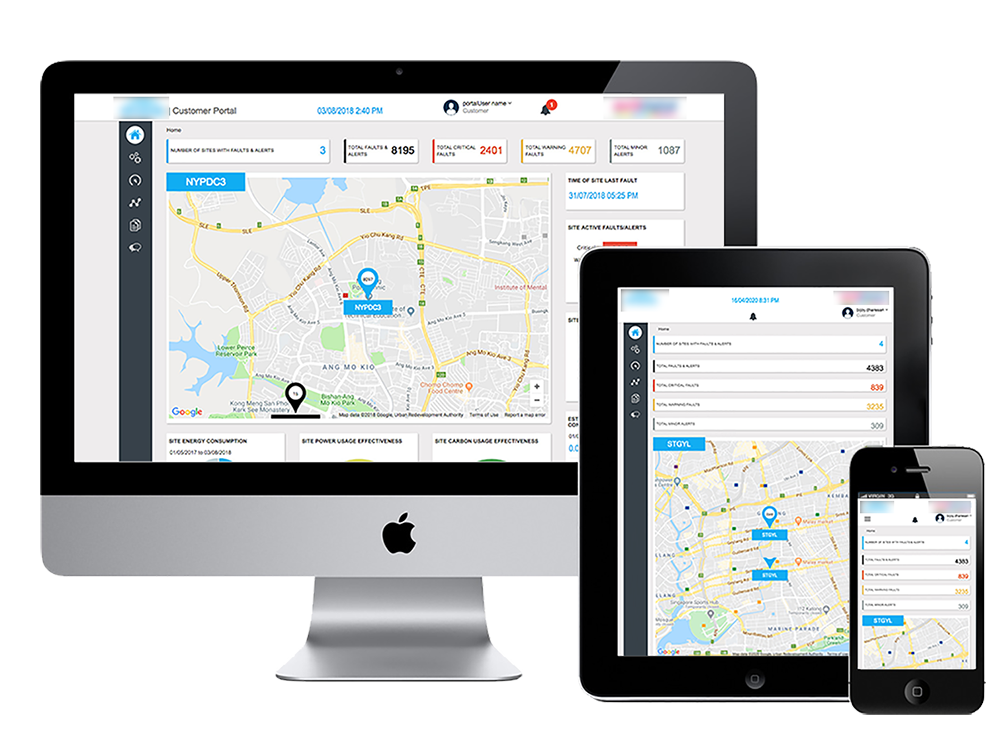
What the platform does
The problem was big. Engineers were responsible for thousands of assets across several sites, and their tools buried them in raw telemetry and false alarms, so real faults were missed and unplanned downtime followed. I led the UX work to turn that noise into decisions.
This case study covers the IoT fleet and predictive monitoring platform I designed. It replaces raw telemetry with a clear view of fleet health, prioritised alerts, and guided next steps.
Scope
Thousands of mechanical and electrical assets across many sites.
Approach
Show health and risk first, and let users drill down on demand.
Too much data, too few decisions
Legacy monitoring tools flooded users with raw sensor readings and false alarms. Alert fatigue set in, and the alerts that mattered were easy to miss. The result was costly, unplanned machinery downtime.
Alert fatigue
Too many notifications, so engineers started to ignore them.
Raw telemetry
Voltage and sensor charts that needed interpretation before any action.
False positives
Maintenance notifications that were not real faults.
Unplanned downtime
Failures that could have been caught earlier.
A progressive zoom from fleet to single asset
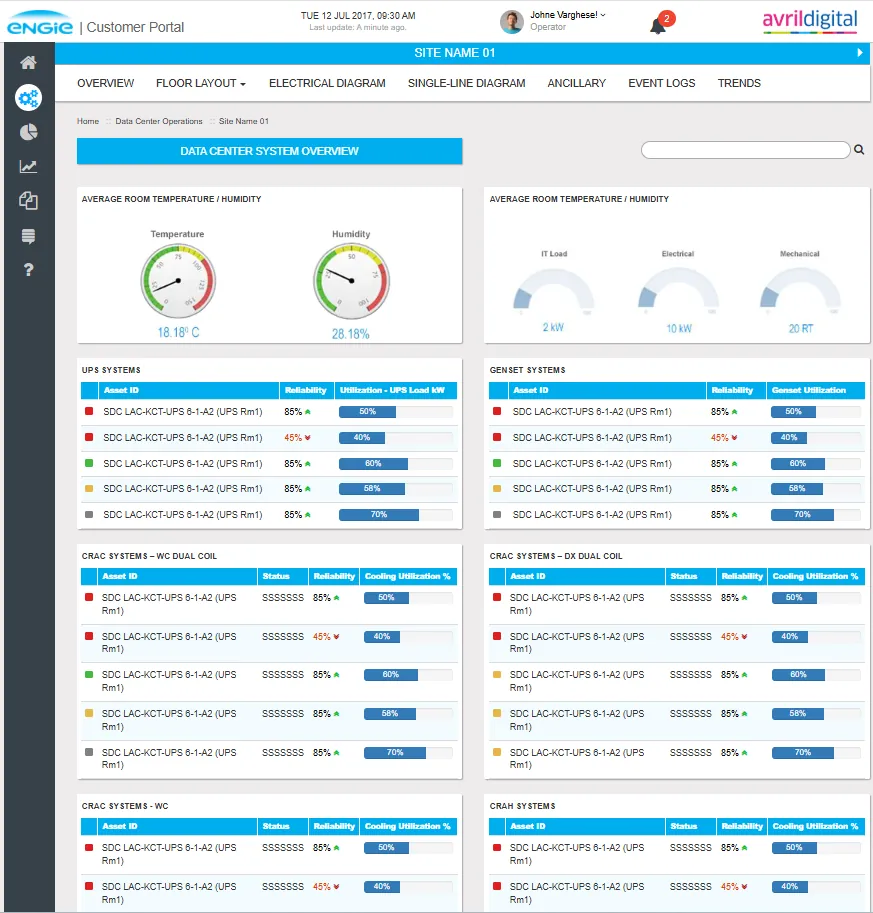
I designed a four-level navigation model. Users move from the global overview to a plant, then to a production line or room, and finally to one piece of equipment, without losing their place.
Showing thousands of assets without overload
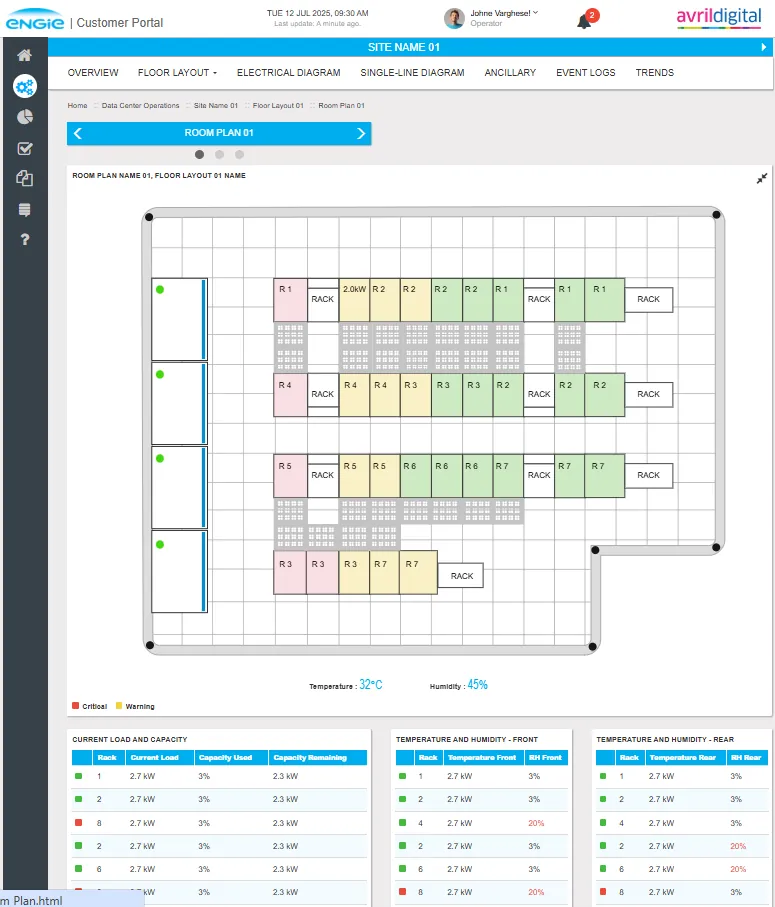
The hardest part was showing a very large number of assets on one screen. I grouped assets into dynamic clusters and surfaced only those that needed attention. The rest stayed visible but quiet.
Clustered heatmaps
Assets are grouped by site and system, so the whole fleet fits on one screen.
Only what matters rises
Critical and warning assets are coloured and placed at the top of each list.
Alerts on the home page
Upcoming alerts appear on the home page, so users notice them before they escalate.
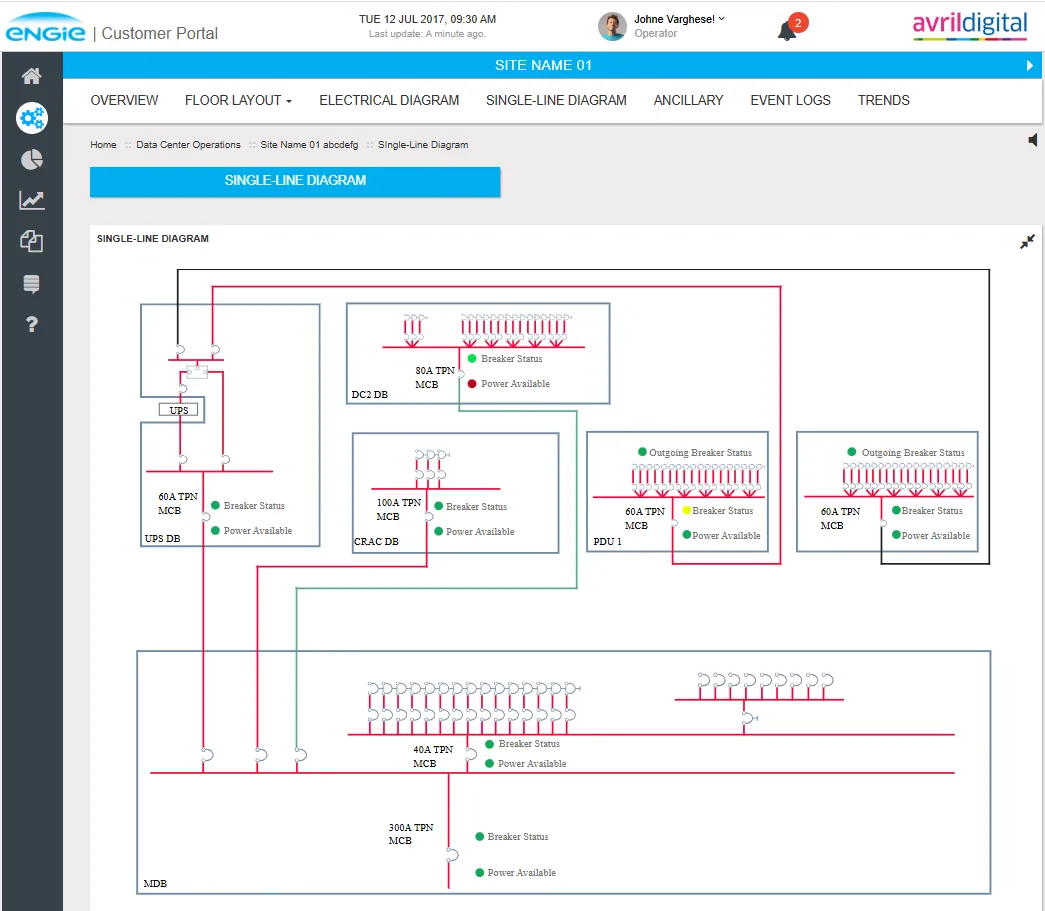
Anomalies, not raw numbers
Raw readings were grouped into anomaly categories: temperature, humidity, load and capacity, and reliability. Each alert names the likely cause, so engineers see the problem before they open the data.
Thermal
Temperature drift on cooling units and return air.
Humidity
Humidity out of range at the front and rear of racks.
Load
Capacity used against capacity remaining, per rack and per system.
Reliability
Equipment reliability scores that fall over time.
Predictions with confidence, and a clear next step
Predictive failure models feed the telemetry panel. Each prediction carries a confidence score and a direct link to order the replacement part.
“88% probability of bearing failure within 72 hours.”
The engineer sees the risk, the time window, and the recommended action in one place, then orders the part directly from the same screen.
One piece of equipment, fully explained
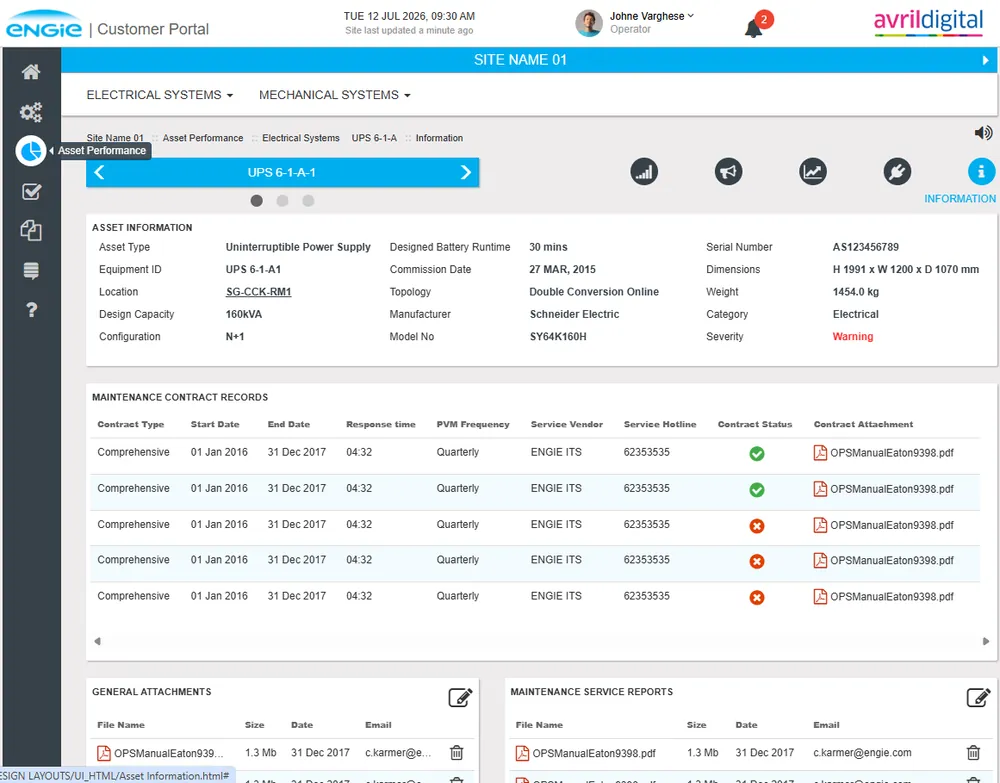
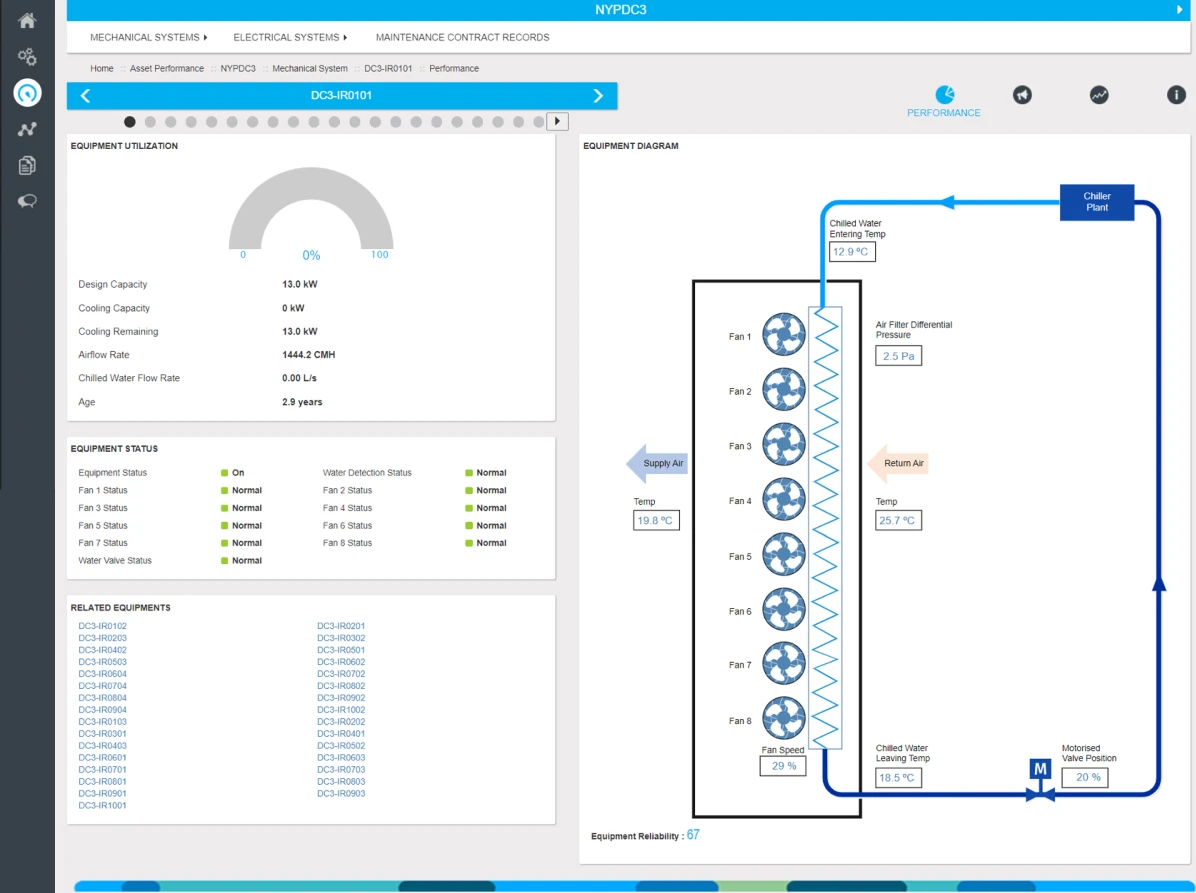
The diagnostic view puts utilisation, equipment status, temperatures, and the equipment diagram together. An engineer can see why an asset is flagged without switching screens.
Charts that stay fast with lots of data
I designed custom interactive line charts that render multi-frequency sensor data smoothly. Engineers can zoom into a time window without the browser slowing down.
Multi-frequency data
Several sensor feeds on one chart, kept readable.
Zoom and compare
Drill into a time window and compare two assets side by side.
Stays responsive
Built to avoid performance loss on large data sets.
What changed
The platform was rolled out across twelve sites. The measures below are the ones tracked after launch.
Critical asset downtime reduced across 12 manufacturing sites.
Fewer false-positive maintenance notifications.
Engineering time saved on manual inspection checks.
Predictive warnings resolved by junior technicians with guided steps.
Guided repair steps for junior technicians
Standard, guided repair steps let junior technicians resolve predictive warnings without waiting for a specialist. The steps follow the same structure on every asset type.
Standard steps
The same repair sequence for each asset type.
Faster learning
Technicians work through the steps with the alert in view.
Shared ownership
Clear handoffs between the platform, the technician, and the reliability team.
Web Core Experience: a design system for a multi-device, multi-product website
A shared framework of components, placement rules, and campaign governance.